‘IT FEELS LIKE A DIFFERENT GAME’: PALWORLD 1.0 MODDING BOOM SPARKS PLAYER REVOLUTION AND SAVE-FILE PANIC
🔥 PALWORLD JUST CHANGED FOREVER AND NOBODY SAW THIS COMING! 🔥
Pocketpair just dropped a massive game-changing feature that completely transforms how you experience Palpagos Islands, but thousands of players are accidentally nuking their entire save files while trying it out… 😱💥
Why is the entire community suddenly abandoning the default camera view, and what lethal technical pitfall is wiping out hundreds of hours of base building in a single click? 👇
The survival-crafting sensation Palworld has reached a new paradigm. Following recent major title updates and official infrastructure expansions, the game’s modding ecosystem has dramatically exploded, allowing players to dismantle traditional third-person constraints and explore Pocketpair’s wilderness through radical new perspectives.
From true First-Person Shooter (FPS) immersion and real-time navigation radars to automated collectible tracking, player-created modifications are redefining daily life on Palpagos. However, as thousands rush to overhaul their client files, community forums on Reddit, X (formerly Twitter), and Discord are sounding the alarm over corrupted saves, fractured worlds, and irreversible progress loss.
Here is an inside look at how the modding boom is sweeping the Palworld community, the essential quality-of-life add-ons driving the trend, and the mandatory safety protocols every Tamer must execute to safeguard their hard-earned progress.
The First-Person Revolution: Seeing Palpagos Eye-to-Eye
For over a year, Tamers have viewed their base operations, Pal combat, and resource gathering from an over-the-shoulder third-person camera. The launch of full Steam Workshop support and integrated Mod Management has completely altered that dynamic.
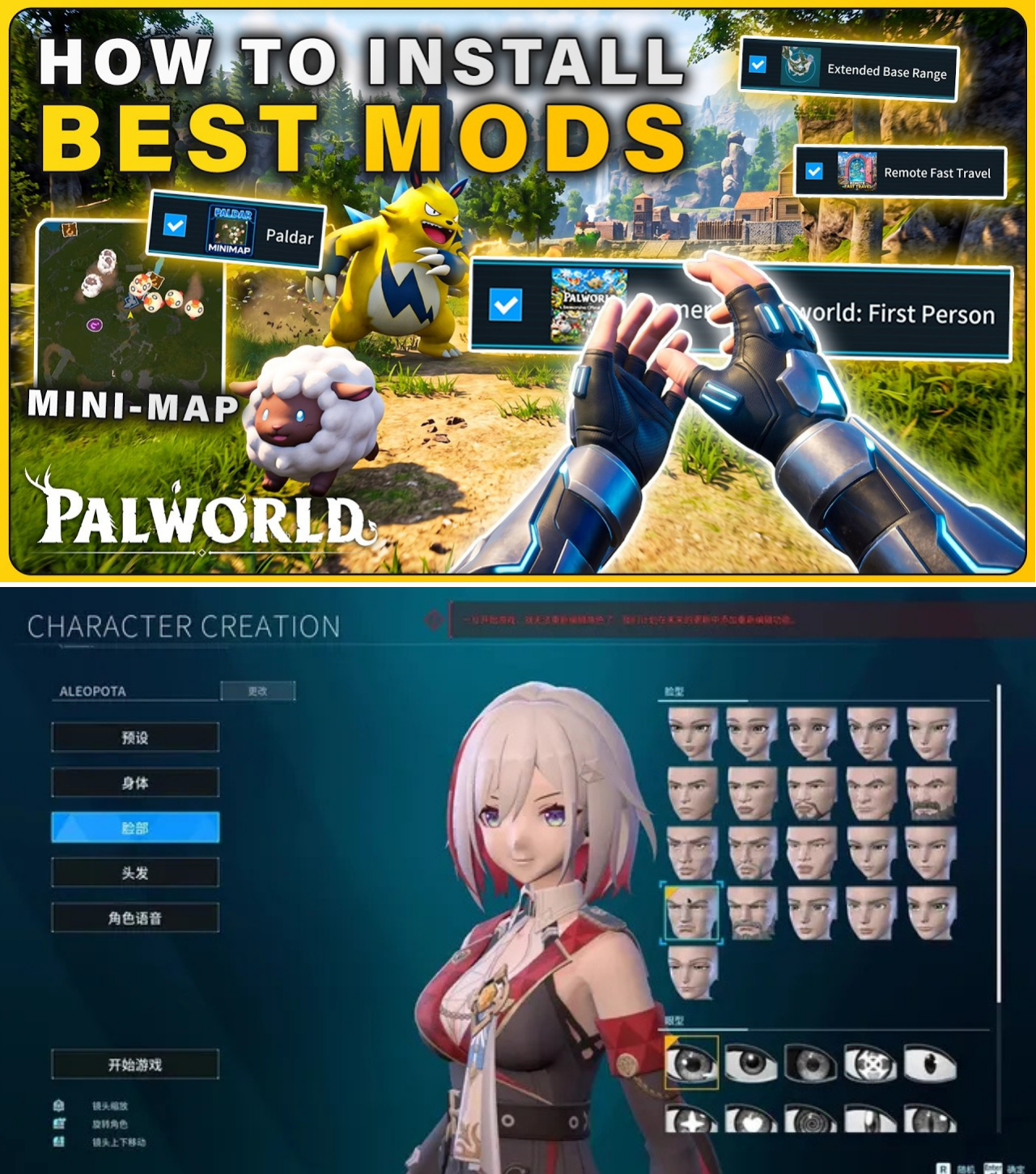
Leading the charge is the viral Immersive Palworld Firstperson mod. By shifting the render camera directly into the player character’s chest and eyes, the modification transforms Palworld from an arcade-style open-world survival game into a tight, visceral first-person shooter reminiscent of Far Cry or ARK: Survival Evolved.
“Aiming down the sights of an Assault Rifle or Musket while a massive Jetragon or Frostallion charges directly at your screen completely changes the combat loop,” shared one popular creator on YouTube. “It feels less like managing a squad and more like surviving in a terrifying, living monster ecosystem.”
The mod dynamically adjusts based on gameplay context:
Combat & Exploration: Complete first-person view with fully rendered gun models, iron sights, and projectile tracking.
Gliding: Renders the underside and handles of gliders directly above the player’s field of view.
Pal Riding & Mounting: Automatically shifts back to third-person when mounting ground or flying Pals to prevent disorienting camera clipping, while offering customizable first-person riding toggles for hardcore enthusiasts.
Field of View (FOV) Adjustments: Features dedicated keybinds (F7 to toggle camera modes, Alt + Scroll Wheel to alter FOV dynamically) to combat motion sickness and camera bobbing.
The QoL Overhaul: Minimaps, Collectibles, and Unlimited Bases
Beyond cosmetic camera shifts, players are actively patching long-standing quality-of-life grievances that Pocketpair’s base game has yet to fully streamline.
1. Real-Time Mini-Maps: PAL Radar (PALR)
Navigating the sprawling biomes of Sakurajima and the Obsidian Volcano previously required constantly pausing gameplay to inspect the full-screen map overlay. The PALR mod solves this by embedding an active, customizable HUD mini-map on the screen.
Navigation: Displays real-time cardinal directions, nearby Fast Travel Points, and active dungeon entrances.
HUD Customization: Players can reposition the radar (L key), edit scale and placement (K key with mouse wheel scrolling), toggle dynamic zoom levels (Z key), or hide the element entirely during cinematic boss encounters (H key).
2. Ultimate Completionist Tracking: Map Collectibles Fixed 1.0
Finding every single glowing Lifmunk Effigy to upgrade Pal Capture Power at the Statue of Power has historically been a tedious endeavor. The Map Collectibles Fixed 1.0 mod introduces an intelligent map overlay and compass tracker that marks missed items in real time:
Statue Upgrades: Highlights all uncollected Lifmunk Effigies across every island zone.
Loot & Lore: pinpoints Ancient Ruins containing rare schematics, active dungeons, supply drops, Alpha Pal spawn points, skill fruit trees, and high-tier treasure chests.
Smart Filtering: Features dedicated toggles to show only missing items while stamping collected nodes with an ‘X’ icon.
3. Base Expansion & Remote Travel
Base builders and mega-structure engineers are celebrating two crucial mechanical tweaks:
Remote Fast Travel: Eliminates the necessity of standing beside a Great Eagle Statue or a base Palbox to teleport across the map. Tamers can trigger Fast Travel directly from any coordinate on the world map.
Extended Base Range: Expands the blue boundary circle generated by the Palbox, effectively doubling or tripling the buildable square footage. This allows for massive multi-tier castles, automated mega-factories, and localized Pal pathing without triggering “out of base bounds” decay mechanics.
4. Performance & Visual Enhancements
To support massive bases, mods like Super Stacks No Lag optimize dropped item entities by condensing loose material piles into consolidated server-friendly stacks, drastically stabilizing FPS during high-yield mining or logging sprees. Conversely, high-end PC enthusiasts are utilizing Ultra Graphics shaders to implement crisp, ray-traced ambient lighting, realistic shadow casting from handheld Lanterns, and vivid nighttime atmospheric bounce.
The Golden Rule: Backing Up Saves Before It’s Too Late
Despite the excitement, modding Palworld comes with severe technical hazards. Mod updates, game patches, or conflicting script dependencies can instantaneously corrupt world data, resulting in infinite loading screens or missing player profiles.
Community leaders and content creators strongly emphasize that duplicating and backing up world saves is mandatory prior to activating the native Mod Management toggle.
How to Properly Duplicate a Palworld Save File on PC:
Locate the Save Directory:
Press Windows Key + R to open the Run console.
Enter %appdata%\Local\Pal\Saved\SaveGames and hit Enter.
Identify Your Profile Folder:
Open the folder named after your Steam/User ID string.
Locate the specific folder representing your active world save (identifiable by creation date or save structure containing backup and Players folders).
Duplicate & Rename:
Copy the target world folder and paste it in the same directory.
Rename the duplicated folder by altering a single character at the end of the string (e.g., changing ...4C to ...4B). Maintaining the identical character length is critical to avoid directory reading errors.
Verify In-Game:
Launch Palworld, navigate to Start Game, and confirm that duplicate world entries appear on the save selection menu.
Safely Enable Mods:
From the main menu, navigate to Options -> Mod Management.
Enable the master toggle (Enable Mod), agree to the risk disclaimer, subscribe to required dependencies via the Steam Workshop, enable desired mods with checkmarks, and restart the client.
Community Reaction: Divided Between Realism and Core Identity
The rapid adoption of client-side modifications has ignited passionate debates across Reddit’s r/Palworld and official Discord channels.
A large portion of the fanbase views first-person play and extended base boundaries as natural evolutions of the survival craft genre. “Playing Palworld in first person with an FOV of 90 feels like playing a AAA open-world shooter,” wrote one Reddit user. “It brings an incredible sense of scale when you stand under a massive Mammorest or look up at a boss tower.”
However, purists argue that altering camera modes and automated tracking undercuts the game’s intrinsic exploration loops. “Part of the magic of Palworld is wandering into the fog of war and stumblng upon a Lifmunk Effigy naturally,” commented another player on X. “When you put every location on a mini-map radar, it turns an adventure game into a checklist.”
Others raise legitimate concerns regarding multiplayer server stability. While client-side visual mods operate smoothly in offline single-player worlds, running heavy base expansion or fast-travel mods on dedicated multiplayer servers often leads to desynchronization errors, Pal pathing bugs, and anti-cheat triggers if server configurations are not explicitly modified to accommodate them.
The Future of Modding in Palworld
As Pocketpair continues to develop major content updates, raid bosses, and new landmasses, the official integration of Steam Workshop mod management signals a strong commitment to long-term community support.
While official developer tools will eventually streamline mod installation even further, the current player-driven ecosystem proves that Palworld has evolved far beyond a fleeting internet trend. Whether through thrilling first-person combat, massive expanded bases, or ultra-crisp lighting shaders, Tamers now possess the power to forge their own custom experiences on Palpagos Islands—provided they back up their save files first.